Automated Mikrotik Management with AI

It’s been a while! This time, I’ll write about a fun project, or more accurately, share some notes about AI and LLMs. I’ve actually been experimenting with AI quite often, but mostly with local AI running on real hardware. That’s a pretty traditional setup; maybe I’ll write about it another day.
Anyway, this post describes my experience using AI as an automation tool. And yes, I used a subscription-based AI service, not local AI.
Intro
I currently have a MikroTik L009UiGS-2HaxD router and two ISPs (though I think I’ll cancel one when I move to my new apartment). Since I have two ISPs, I configured them as a PCC load balancer so both can be used at the same time and can serve as backups for each other.
1
2
3
4
5
6
7
8
9
10
11
12
13
14
15
16
17
   +-----------+          +-----------+
   |   ISP A   |          |   ISP B   |
   +-----+-----+          +-----+-----+
         |                      |
         | WAN1                 | WAN2
         |                      |
   +-----+----------------------+-----+
   |                                  |
   |     Router (Load Balancer)       |
   |                                  |
   +----------------+-----------------+
                    |
                    | LAN
                    |
              +-----+-----+
              |   Client  |
              +-----------+
Issues
The issue I had was that one ISP’s quality was sometimes poor, especially on international routes. I needed a way to detect this. Since ping uses a lightweight protocol, it can’t reliably serve as the only metric. I thought about using Speedtest on an international route.
Fortunately, Speedtest can target a specific region and can be run through the CLI. The next question was, “How can I run Speedtest on MikroTik? Or should I run it on another machine and send the results to MikroTik?” At first, I considered adding a bridge interface between each ISP and the router and attaching a VM to each bridge, so I could run Speedtest through each ISP.
1
2
3
4
5
6
7
8
9
10
11
12
13
14
15
16
17
18
19
20
21
22
   +-----------+              +-----------+
   |   ISP A   |              |   ISP B   |
   +-----+-----+              +-----+-----+
         |                          |
         | WAN1                     | WAN2
         |                          |
   +-----+-----+              +-----+-----+
   |  Bridge   |----> VM      |  Bridge   |----> VM
   +-----+-----+              +-----+-----+
         |                          |
         |                          |
   +-----+--------------------------+-----+
   |                                      |
   |       Router (Load Balancer)         |
   |                                      |
   +-------------------+------------------+
                       |
                       | LAN
                       |
                 +-----+-----+
                 |   Client  |
                 +-----------+
However, this topology required many changes to the MikroTik configuration to forward traffic through the bridges to the VMs, as well as physical changes, so I abandoned it.
After doing a little research, I found out that MikroTik now supports containers [1]. I hadn’t been following MikroTik news, so this was new to me. Since containers can run on the router, we can simply connect a veth interface from the router to each container.
1
2
3
4
5
6
7
8
9
10
11
12
13
14
15
16
17
18
19
20
21
22
23
24
      +-----------+          +-----------+
      |   ISP A   |          |   ISP B   |
      +-----+-----+          +-----+-----+
            |                      |
            | WAN1                 | WAN2
            |                      |
   +--------+----------------------+--------+
   |       Router (Load Balancer)           |
   |                                        |
   |  +-----------+          +-----------+  |
   |  |  Bridge   |          |  Bridge   |  |
   |  +-----+-----+          +-----+-----+  |
   |        |                      |        |
   |  +-----+-----+          +-----+-----+  |
   |  | Container |          | Container |  |
   |  +-----------+          +-----------+  |
   |                                        |
   +-------------------+--------------------+
                       |
                       | LAN
                       |
                 +-----+-----+
                 |   Client  |
                 +-----------+
Dockerfile and entrypoint
Dockerfile ```Dockerfile FROM alpine:latest AS build ARG ARCH=armhf COPY ./entrypoint.sh /entrypoint.sh RUN chmod +x /entrypoint.sh RUN wget -O speedtest.tgz \ "https://install.speedtest.net/app/cli/ookla-speedtest-1.2.0-linux-${ARCH}.tgz" \ && tar zxvf speedtest.tgz \ && chmod +x speedtest && chown root:root speedtest RUN rm speedtest.tgz RUN wget https://curl.se/ca/cacert.pem FROM alpine ENV SERVER_ID= ENV SIMPLE_OUTPUT= RUN apk add --no-cache jq COPY --from=build /speedtest /bin/ COPY --from=build /entrypoint.sh /bin/ COPY --from=build /cacert.pem / CMD ["/bin/entrypoint.sh"] ``` entrypoint ```bash #!/bin/sh set -eu run_speedtest() { if [ -n "${SERVER_ID:-}" ]; then /bin/speedtest --server-id="${SERVER_ID}" --accept-license --ca-certificate=/cacert.pem -f json else /bin/speedtest --accept-license --ca-certificate=/cacert.pem -f json fi } if [ -n "${SIMPLE_OUTPUT:-}" ]; then echo "Using simple output" run_speedtest 2>1 | jq -r '{download: .download.bandwidth, upload: .upload.bandwidth, url: .result.url}' exit 0 fi if [ -n "${SERVER_ID:-}" ]; then echo "Using server ID: ${SERVER_ID}" else echo "Using nearby server" fi run_speedtest ``` Note: To run this container, I set the SERVER_ID environment variable to Singtel so it would use an international route.Solution
Now I have a way to measure internet quality using Speedtest, and I can run it through each ISP. The next step is to let AI consume the results and decide whether to recalibrate the PCC load balancer.
Before that, I needed to connect MikroTik to the AI interface. I could connect over SSH (which would give the AI full control of the router, which is bad), or I could create or use an MCP server. Fortunately, someone had already created a MikroTik MCP server (https://github.com/wiresage/mikrotik-mcp). However, its scope wasn’t complete. For example, it didn’t include firewall or container management, so I had to add those features myself (https://github.com/JustHumanz/mikrotik-mcp/pull/3).
1
2
3
4
5
6
7
8
9
10
11
12
13
14
15
16
17
18
19
20
21
22
23
24
      +-----------+          +-----------+
      |   ISP A   |          |   ISP B   |
      +-----+-----+          +-----+-----+
            |                      |
            | WAN1                 | WAN2
            |                      |
   +--------+----------------------+--------+
   |       Router (Load Balancer)           |        +-----------+
   |                                        |------->|    MCP    |
   |  +-----------+          +-----------+  |        +-----------+
   |  |  Bridge   |          |  Bridge   |  |
   |  +-----+-----+          +-----+-----+  |
   |        |                      |        |
   |  +-----+-----+          +-----+-----+  |
   |  | Container |          | Container |  |
   |  +-----------+          +-----------+  |
   |                                        |
   +-------------------+--------------------+
                       |
                       | LAN
                       |
                 +-----+-----+
                 |   Client  |
                 +-----------+
Now I have all the tools and setup I need. Let’s let AI do the work.
Here’s the PoC.
First, I asked Copilot to start the tests. It immediately ran two containers and waited for them to finish. 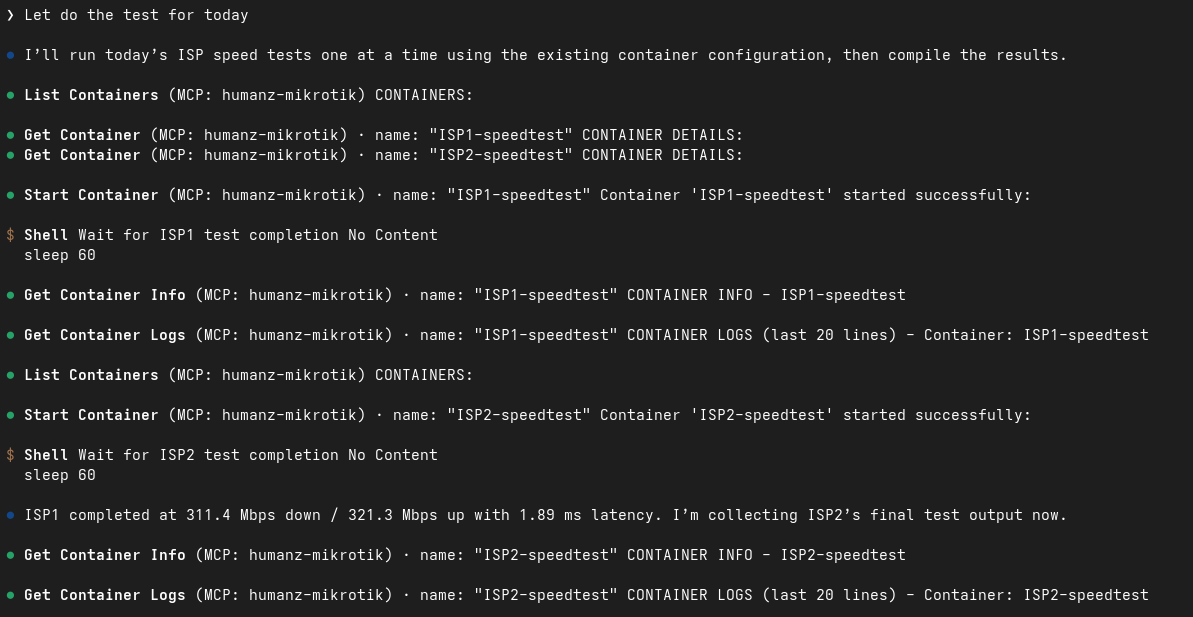
Once the containers stopped and the results were available, Copilot displayed the data. 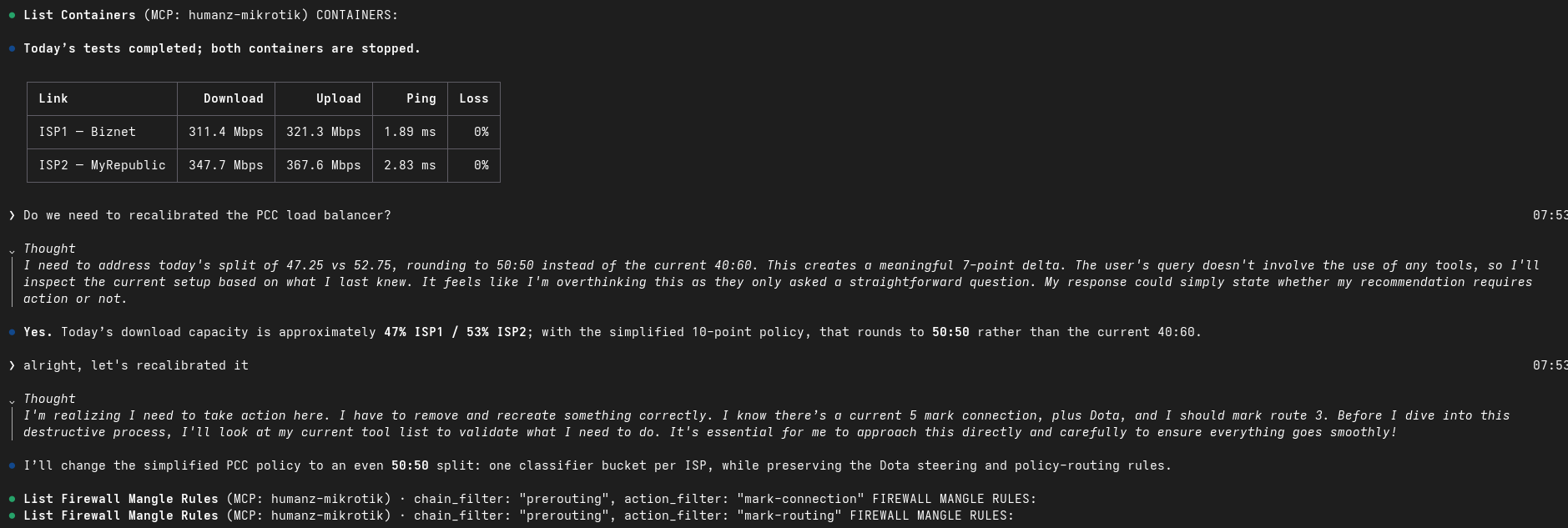
Although I had to ask Copilot whether it needed to recalibrate the PCC, it then automatically recreated the firewall mangle rules to recalibrate the load balancer.
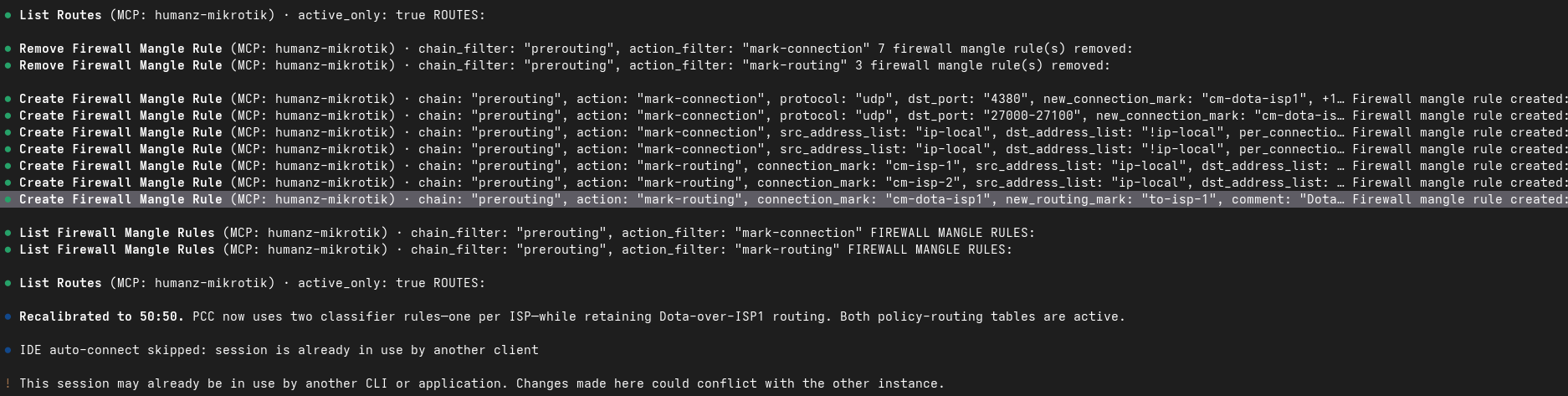
References
- https://help.mikrotik.com/docs/spaces/ROS/pages/84901929/Container
Comments powered by Disqus.